
Free vehicle check-in and check-out sheets for panel shops
Print the check-in sheet when a car arrives and the check-out sheet when it leaves. Walk around the car with the customer, tick the boxes, mark the damage on the drawing and get a signature. Free PDFs, no sign-up.
Add your workshop name and logoOne A4 page each. Print and copy as many as you like.
Make it yours
Add your workshop name and logo
Your name, contact details and logo go at the top of the check-in and check-out sheets, ready to print.
Your workshop details
Everything here is optional. Leave it all blank for a sheet with a box for your stamp.
PNG, JPG, WebP or HEIC, up to 5 MB. A logo on a white or clear background prints best.
Your details and logo stay on this device. Nothing is uploaded.
What's on the sheet
Everything you check when a car comes in
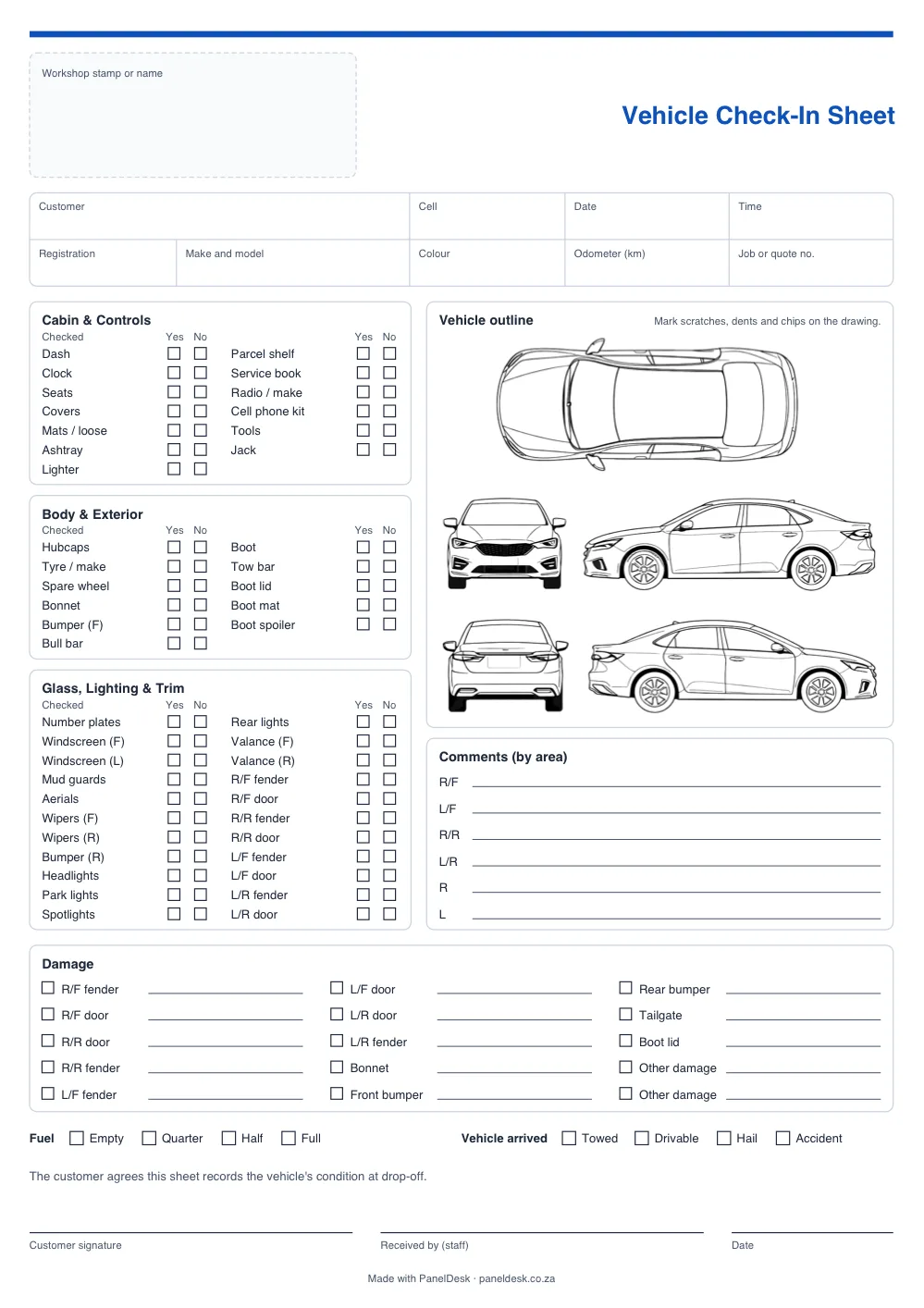
The same list PanelDesk prints from the job card as standard, on one A4 page.
Customer and vehicle details
Customer, cell, registration, make and model, colour, odometer, date and time, and the job or quote number.
46 items to tick
Cabin and controls, body and exterior, and glass, lighting and trim, each with a Yes and a No box.
A car drawing to mark damage
Top, front, back and both sides, with a comment line for each corner and each side.
A damage list
13 panels, each with a tick box and a line for notes, plus space for any other damage.
Fuel and how the car arrived
Fuel from empty to full. The check-in sheet also records whether the car came in towed or drivable, with hail or accident damage.
Signatures
The customer and your staff sign and date it, under a line saying the sheet records the car's condition.
Want it filled in for you?
PanelDesk prints the check-in and check-out sheets from the job card, with the customer, the vehicle and your logo already on them. Each workshop edits its own lists in Settings.
How to use it
Four steps at drop-off
Fill in the details with the customer there
Write down the customer's name and cell number, the car's registration, make, model and colour, and the date and time.
Walk around the car together
Tick each item, mark scratches, dents and chips on the drawing, and take photos of anything serious.
Note the fuel, mileage and valuables
Tick the fuel level, write down the odometer reading, and note anything valuable left in the car.
Both sign, and do it again at collection
The customer signs, and so does whoever received the car. Give the customer a copy or a photo of the sheet. When they collect, fill in the check-out sheet the same way.
Why it matters
A signed sheet beats a memory
It settles “that scratch wasn't there”
When the scratch is marked on the drawing and the customer signed the sheet, the conversation at collection is a short one.
Insurers ask for it
MiWay's published minimum requirements for motor body repairers, for example, list a “standard vehicle check-in and check out list”.
Every car gets the same check
Whoever books a car in works through the same list, even on a busy day, and the customer sees you looked after their car from the moment they handed over the keys.
FAQ
Check-in and check-out sheet questions
Quick answers about the free check-in and check-out sheets.
Yes. Download it, print it and copy it as often as you like. There is nothing to sign up for and nothing to pay.
Yes. Add your workshop name, phone number, email or website, address and logo in the form above, then download. They print at the top of both sheets.
No. The PDF is made on your device, in your browser. Your details and logo are not sent to us or saved anywhere.
Use it when the customer collects the car. It has the same checks and the same drawing, so you have a record of the car's condition when it left, and the customer signs to say they received it.
Not on the free sheet: the list is fixed. In PanelDesk, each workshop edits its own check-in and check-out lists in Settings, and the sheet prints from the job card with the job's customer, vehicle and your logo already on it.
The drawing is a sedan. For a bakkie, truck or trailer, mark the damage on the closest view and write it in the damage list.
PanelDesk
Check-in sheets that fill themselves in
PanelDesk prints the check-in and check-out sheets straight from the job card, so the customer, the vehicle and your logo are already on them.
- Filled in from the job card
- Your own list, edited in Settings
- Quotes to invoices in one place
30 days free. No card, nothing to install.